
Creating a Bill of Quantities: Structure, Sample, Rules and GAEB File
How a BoQ is structured, which item types exist, what VOB/A and the Austrian BVergG require, and how plans and a building description become a GAEB file.

The bill of quantities decides whether bids are comparable and whether the estimate holds. Every item needs a clear description, a quantity and a unit, and the whole document must be complete enough that every bidder reads it the same way and can price it reliably. This guide shows the structure with a sample, the rules of the German VOB/A and the Austrian BVergG 2018, the standard texts and the way to a GAEB file. It also shows how the Tenderhub AI agent creates and prices the BoQ from your plans and building description.
What a bill of quantities is
The bill of quantities (BoQ, German: Leistungsverzeichnis or LV) describes construction work as a list of items. Each item has a reference number, a description, a quantity and a unit. Together with the building description, the BoQ forms the specification of the work, as section 7b(1) of the German VOB/A provides. In Austria, section 105 of the BVergG 2018 requires extensive work to be broken down in a bill of quantities, preceded by a summary description of the whole.
The bidder enters a unit rate for each item. Under a unit-price contract, the work is paid at the contract unit rates for the work actually carried out (VOB/B section 2(2)). If the executed quantity deviates by more than 10 % from the estimate, the price is adjusted on request (VOB/B section 2(3)). The quantities in the BoQ are therefore not a formality: they help decide how robust the bid and the final account are.
Structure: reference number, texts, quantity, price
A BoQ is organised hierarchically, usually by lots, trades and sections. Every item has the same parts:
- Reference number (OZ): the item number, for example 01.02.0010 for section 01, subsection 02, item 0010. It links bid, bid tabulation and final account.
- Short text: one line naming the item.
- Long text: the full description with material, dimensions, quality, workmanship and location in the building.
- Quantity and unit: the estimated quantity from the takeoff, in the unit used for payment, such as m², m³, m, pcs, kg or lump sum.
- Unit rate and total: the bidder enters the unit rate; the total is quantity times unit rate.
The preliminaries come before the items: general ones for the whole project, technical ones for each trade. They set out what applies to all items and are part of the specification. In Austria, the standardised specifications divide the BoQ into work groups and subgroups (Leistungsgruppen and Unterleistungsgruppen).
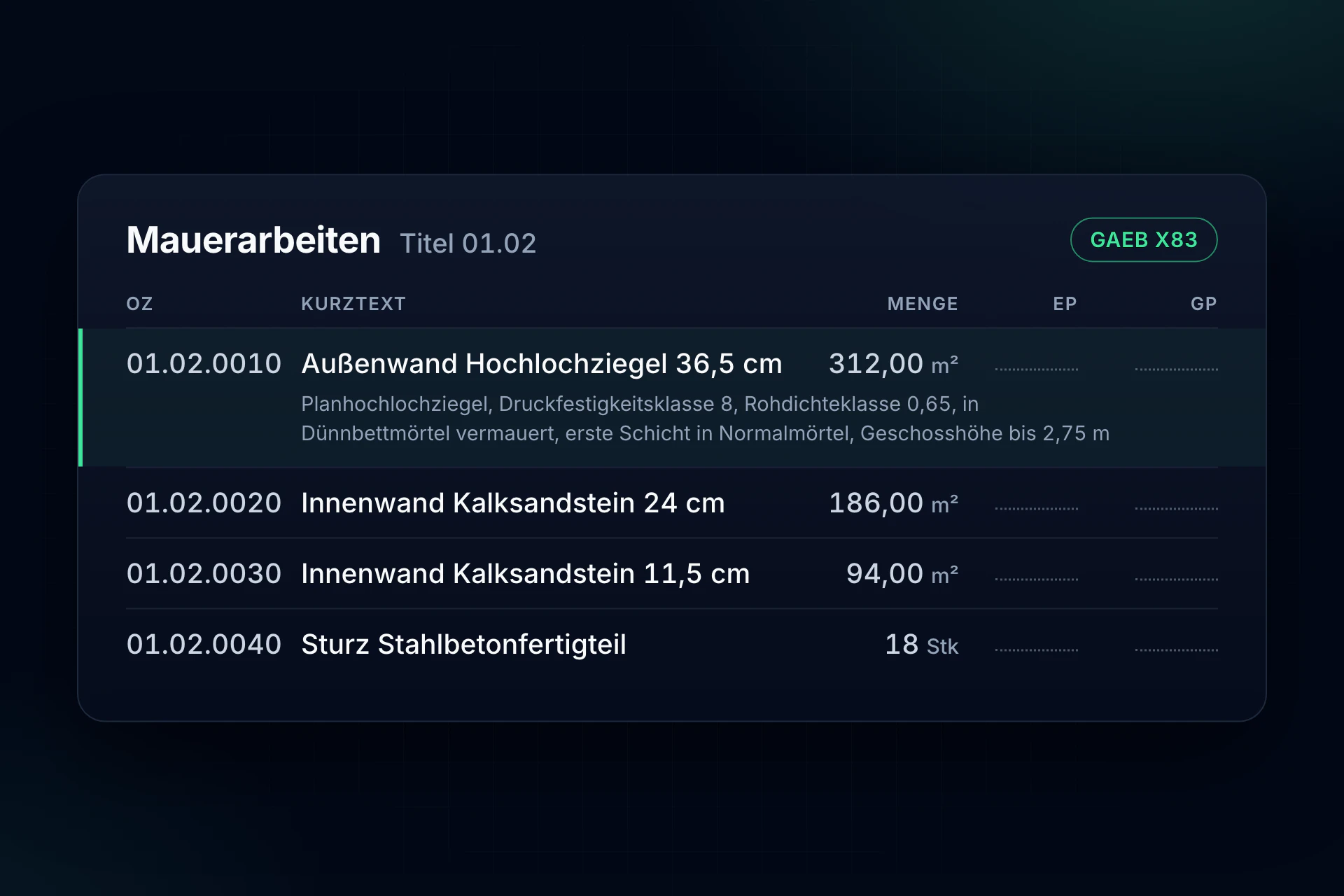
Sample: a BoQ extract for masonry
This is what a section looks like, here the masonry for the shell of a residential building:
- 01.02.0010 External wall, perforated clay brick 36.5 cm: 312.00 m²
- 01.02.0020 Internal wall, sand-lime brick 24 cm: 186.00 m²
- 01.02.0030 Internal wall, sand-lime brick 11.5 cm: 94.00 m²
- 01.02.0040 Lintel, precast reinforced concrete: 18 pcs
The long text of the first item could read: “External wall of precision-ground perforated clay bricks, wall thickness 36.5 cm, compressive strength class 8, density class 0.65, laid in thin-bed mortar, first course in general-purpose mortar, ground and first floor, storey height up to 2.75 m.” A bidder must be able to price it without asking: material, thickness, mortar, location and what is included.
Item types
- Standard item: carried out and paid by the actual quantity. The normal case.
- Provisional item: carried out only if needed. Under VOB/A section 7(1) no. 4, such items generally do not belong in the specification.
- Alternative item: an alternative to a base item when the client has not yet decided. The client chooses at award.
- Supplement item: an extra charge on a base item, for example for fair-faced masonry on part of the wall area.
- Lump-sum item: work at a fixed amount, such as site setup.
- Daywork: may be attached only to the extent strictly necessary (VOB/A section 7(1) no. 4).
One reference number covers only work that is of the same kind technically and for pricing (VOB/A section 7b(4)). Combining unlike work produces mixed rates that can neither be compared nor paid cleanly.
What VOB/A and BVergG require
For public clients these rules are mandatory. For private clients they are the benchmark a good BoQ is measured against:
- Clear and exhaustive: the work must be described so that all companies understand the description in the same sense and can calculate their prices reliably and without extensive preparatory work (VOB/A section 7(1) no. 1). The Austrian BVergG 2018 requires a clear, complete and neutral description so that bids are comparable (section 104(1)).
- Everything that affects the price: such as the soil and groundwater conditions on site (VOB/A section 7(1) nos. 2 and 6). In Austria, section 104(3) BVergG 2018 names difficult conditions explicitly.
- No unusual risk for circumstances the bidder cannot influence (VOB/A section 7(1) no. 3).
- Product-neutral: brands and types only by exception, when the work cannot otherwise be described precisely enough, and then with “or equivalent” (VOB/A section 7(2)).
- Section 0 of the ATV: DIN 18299 and the trade standards of VOB/C list in section 0 what the specification must state. These notes must be followed (VOB/A section 7(1) no. 7).
- Ancillary and special work: ancillary work (Nebenleistungen) is part of the work even if not mentioned and needs no item of its own (VOB/A section 7b(3)). Special work (Besondere Leistungen) is only included if the specification mentions it expressly (DIN 18299, section 4.2). What is missing here turns into a claim later.
In Austria, suitable guidelines such as ÖNORM standards and standardised specifications must be taken into account (section 105(3) BVergG 2018).
Standard texts: STLB-Bau, LB-HB and NPK
You do not have to write long texts from scratch each time. In Germany, the standard specification library STLB-Bau from GAEB and DIN provides texts for a VOB-compliant BoQ. It is organised by the trades of VOB/C, updated every six months, mandatory for federal building projects and contains no prices.
In Austria, the ministry of economic affairs provides the standardised specifications free of charge, for building construction (LB-HB) and building services (LB-HT). In Switzerland, it is the standard item catalogue NPK published by CRB.
The BoQ as a GAEB file
Between designer, client and bidders, the BoQ travels as a GAEB file, the recognised exchange format of the German Joint Committee for Electronics in Construction. The current version is GAEB DA XML 3.3. Each phase has its own data type, and the file extension names it:
- X81 Specification: the BoQ without prices.
- X83 Request for bids: the BoQ sent to bidders.
- X84 Bid submission: the BoQ with the bidder’s prices.
- X86 Contract award: the BoQ that becomes the contract.
Older versions end in D83 (GAEB 90) or P83 (GAEB DA 2000); the data type numbers have stayed the same. A GAEB file opens in tendering (AVA) or estimating software or in a GAEB viewer. In AVA software, the bidders’ X84 files become the bid tabulation.
Six steps to a BoQ
- 1. Gather the basis: construction drawings, building description, reports on soil, structure and fire safety, and the client’s requirements.
- 2. Structure: define lots, trades and sections the way the work will be awarded and paid.
- 3. Write the items: from standard texts or your own, with everything the bidder needs for the price.
- 4. Take off the quantities: from the drawings, following the measurement rules of the relevant ATV. How this works for each trade is shown in our takeoff guides, for example for shell construction.
- 5. Check: completeness, interfaces between trades and contradictions between BoQ, drawings and building description.
- 6. Price: the designer prices the BoQ for the cost estimate, the bidder for the bid.
Under the German HOAI fee scale, preparing the bills of quantities and determining the quantities belong to work stage 6, as does the cost estimate based on the BoQs priced by the designer (Annex 10.1 HOAI).
Creating a BoQ with the Tenderhub AI agent
Most of the time a BoQ takes goes into reading, not formatting: going through plans and building description, deriving items, writing texts, taking off quantities, setting prices. The AI agent in Tenderhub takes on this work:
- From plans and building description: you upload the documents and give the brief, for example “build the shell BoQ”. The agent creates the items with texts, quantities and unit rates.
- Every price with its source: from your stored rates and projects or from local market rates.
- As a GAEB file: for your AVA or estimating software, or as Excel on request.
- Also for a BoQ from a tender: whether GAEB, ÖNORM BoQ, Excel or PDF, the agent prices it, adds missing items or restructures it.
- Changes in the same chat: add site setup, restructure a section, price with other rates.
Review and approval stay with your team. Your documents are stored in data centres in the EU, kept apart from other companies, and are never used to train AI models. Everything about the AI agent: create and price a bill of quantities with AI.
Frequently asked questions
What is a bill of quantities?
A description of construction work in individual items, each with a reference number, text, quantity and unit. Bidders enter a unit rate for each item. Together with the building description, the BoQ forms the specification.
Who prepares the bill of quantities?
Usually the designer on behalf of the client, in work stage 6 under the HOAI. Contractors prepare BoQs to award work to subcontractors, and every bid ends up as a priced BoQ.
What is the difference between a bill of quantities and a specification?
The specification is the umbrella term. With a bill of quantities, it consists of the building description and the BoQ (VOB/A section 7b). With a functional specification, the client describes the purpose and requirements and the bidder designs the solution (VOB/A section 7c).
What is a GAEB file?
The exchange format for bills of quantities. The extension names the phase, such as X83 for the BoQ sent to bidders and X84 for the bid with prices. It opens in AVA or estimating software or in a GAEB viewer.
Can AI create a bill of quantities?
Yes. The Tenderhub AI agent creates a BoQ with items, texts, quantities and unit rates from plans and building description and delivers it as a GAEB file. On request it adds individual items with their tender text or prices an existing BoQ. Your team reviews and approves.
Is there a bill of quantities template?
The standard sets the structure: reference number, short text, long text, quantity, unit, unit rate and total, organised in sections. Ready-made item texts come from STLB-Bau, in Austria from the standardised specifications and in Switzerland from the NPK. The sample above shows what a section looks like.
Tendering and award
More guides:
- Creating a bid tabulation: comparing bids item by item
- Finding gaps in the bill of quantities before they cost your margin
- AI tender analysis: risks, criteria and deadlines
All use cases at a glance: Tenderhub for estimating and tendering.