
Creating a Bid Tabulation: Comparing Bids Item by Item and Evaluating Them Correctly
How a bid tabulation is structured, what it reveals, which rules apply when evaluating bids and how the AI agent builds it from PDF and Excel bids.

Three bids, three totals, and the cheapest is often not the most economical. Only the bid tabulation (German: Preisspiegel) sets the bidders’ unit rates side by side, item by item, and shows where someone left an item unpriced, miscalculated or shifted prices. This guide shows the structure and template, a worked example and the rules of the German VOB/A and the Austrian BVergG 2018. It also shows how the Tenderhub AI agent builds the bid tabulation from your bids, even when every bidder structures theirs differently.
What a bid tabulation is
A bid tabulation sets the bids of several bidders based on the same bill of quantities side by side: the items row by row, the bidders column by column. It is the basis for checking and evaluating bids and for the award. Under the German HOAI fee scale, preparing a bid tabulation by individual items or work packages belongs to work stage 7 (Annex 10.1 HOAI).
A bid comparison goes further: besides prices, it checks scope, exclusions, conditions and alternative bids. How that works with AI is shown in the use case compare bids.
Template: the columns a bid tabulation needs
- From the BoQ: reference number, short text, quantity and unit.
- Per bidder: unit rate and total.
- Per item: lowest unit rate, average and each bidder’s deviation from the average in percent.
- Per section and at the end: the totals per bidder, with discounts and alternative bids on separate lines.
- Remarks: missing prices, arithmetic errors, qualifications and open questions.
One more column belongs to your own estimate, the cost calculation or the BoQ priced by the designer. Under the HOAI, the tender results have to be compared with it in work stage 7 anyway.
Example: three bids for the masonry
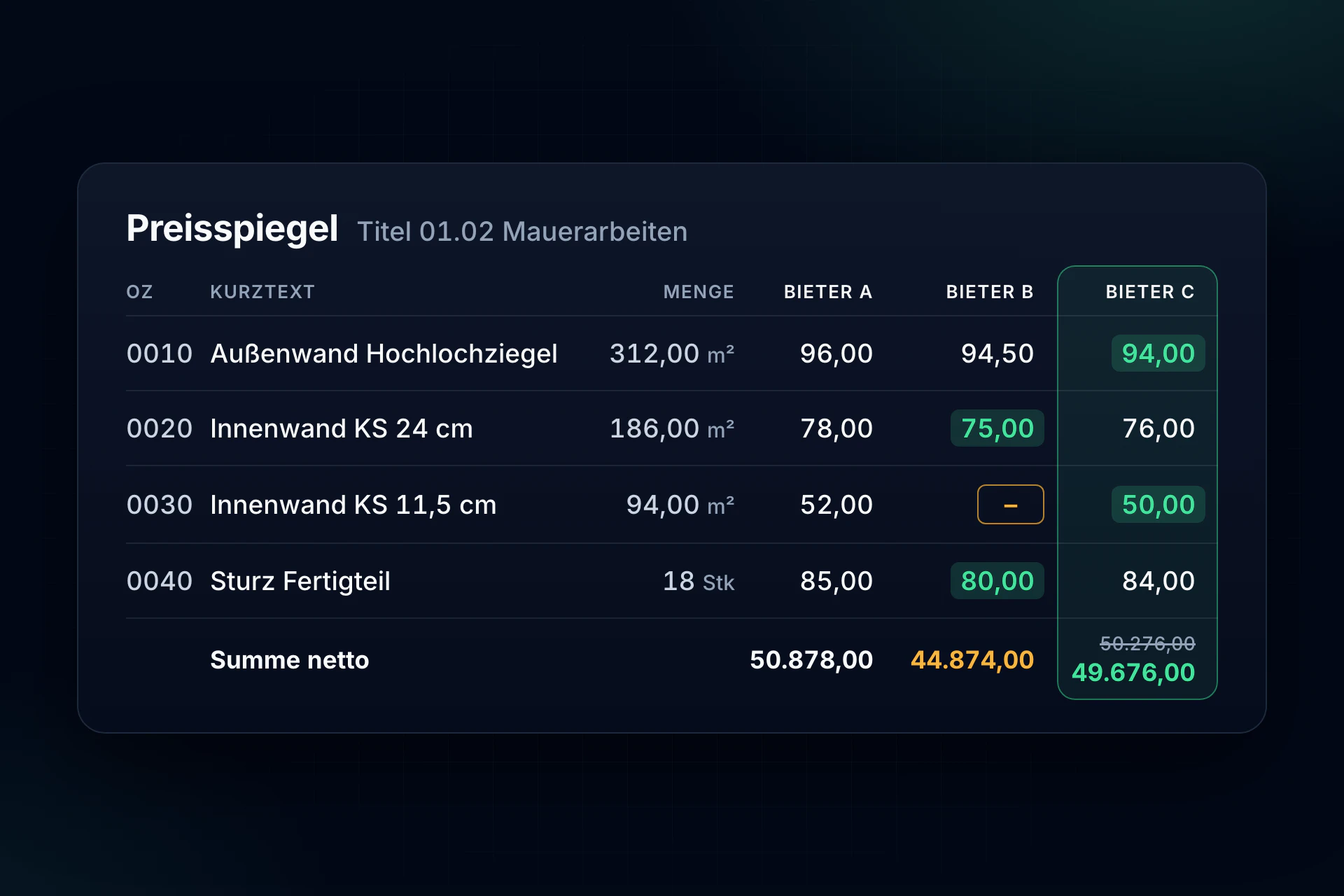
Three bidders priced the masonry section from the sample in our bill of quantities guide. The unit rates in euros, net:
- 01.02.0010 External wall, clay brick, 312.00 m²: A 96.00 · B 94.50 · C 94.00
- 01.02.0020 Internal wall, sand-lime 24 cm, 186.00 m²: A 78.00 · B 75.00 · C 76.00
- 01.02.0030 Internal wall, sand-lime 11.5 cm, 94.00 m²: A 52.00 · B no price · C 50.00
- 01.02.0040 Lintel, 18 pcs: A 85.00 · B 80.00 · C 84.00
The bid totals: A €50,878.00, B €44,874.00, C €50,276.00. B appears to be €5,402 below C. The bid tabulation shows why that is wrong:
- Arithmetic error by C: item 0010 shows a total of €29,928.00. But 312.00 m² times €94.00 is €29,328.00. The unit rate prevails (VOB/A section 16c(2)), so C’s total falls to €49,676.00.
- Missing price from B: B gave no price for item 0030. Using the highest competing price there, A’s €52.00, B comes to €49,762.00, €86 behind C.
- Result: C is the cheapest complete bid. Under VOB/A, B would even have to be excluded: missing prices are not requested afterwards, and the exception for insignificant items applies only if the ranking stays the same even with the highest competing price (VOB/A section 16a(2)). Here it changes.
Comparing totals alone, B would come first, and item 0030 would follow later as a claim.
What a bid tabulation reveals
- Arithmetic errors: if an item’s total does not match quantity times unit rate, the unit rate prevails (VOB/A section 16c(2)). The Austrian BVergG 2018 also requires checking that a bid is arithmetically correct (section 135(2)).
- Missing prices: under VOB/A they usually lead to exclusion (section 16a(2)).
- Altered tender documents: if a bidder changed texts, quantities or units, the tabulation shows it because the row no longer matches. Changes to the tender documents are not permitted, and such bids are excluded (VOB/A section 13(1) no. 5 and section 16(1) no. 2).
- Unusually low or high prices: a bid with an unreasonably high or low price must not win the contract. If a price seems unreasonably low, the client asks for an explanation (VOB/A section 16d(1)). In Austria, the client must ask and, where needed, examine the bid in depth, among other cases when unit rates in significant items are too high or too low (section 137(2) BVergG 2018).
- Shifted prices: one cent in one item, the mark-up hidden in another. Bids with such mixed pricing are generally excluded (Federal Court of Justice, decision of 18 May 2004, X ZB 7/04). It becomes expensive above all when quantities change later.
- Discounts and alternative bids: unconditional discounts only count if they appear where the client specified; unsolicited early-payment discounts do not count at all (VOB/A section 16d(4)). Alternative bids are evaluated unless the client did not allow them (VOB/A section 16d(3)).
The contract goes to the most economical bid, determined by the best price-performance ratio (VOB/A section 16d(1) no. 4). The bid tabulation supplies the figures for that.
Bid tabulation in AVA software or Excel
In AVA software, the bid tabulation almost builds itself when all bidders bid digitally: they receive the BoQ as a GAEB X83 file and return their prices as X84, and the software imports the files and sets them side by side. In practice, many bids arrive as PDF or as the bidder’s own Excel list, especially from subcontractors. Then it means retyping. For a bid tabulation in Excel, these are the key formulas:
- Total: quantity times unit rate, calculated yourself for each bidder rather than copied from the bid. That way arithmetic errors show up.
- Minimum and average: MIN and AVERAGE over the unit rates in a row. Empty cells are ignored.
- Deviation: unit rate divided by the average minus 1, formatted as a percentage. Conditional formatting marks outliers, for example from 30 % above or below the average.
- Missing prices: COUNTBLANK over each bidder’s price column.
Bid tabulation with the Tenderhub AI agent
With three bidders and 400 items, 1,200 unit rates have to be typed in, matched and checked, and every bidder structures their bid a little differently. The AI agent in Tenderhub takes on this work:
- Read the bids: PDF and Excel bids, together with your reference BoQ.
- Match items: equivalent and similar work lands in the same row, even if a bidder structured or named it differently. The agent marks uncertain matches for review.
- Show differences: missing items, changed quantities, different units, alternatives, textual qualifications and price outliers.
- As Excel: the bid tabulation comes as a structured table for award, clarifications and estimating.
Review and the award decision stay with your team. Your documents are stored in data centres in the EU, kept apart from other companies, and are never used to train AI models. The full workflow: tender bid comparison with Tenderhub.
Frequently asked questions
What is a bid tabulation?
A table that sets the bids of several bidders side by side, item by item, with unit rates, totals and sums. It is the basis for checking, evaluating and awarding.
How do you create a bid tabulation?
Match all bids to the items of the reference BoQ, enter unit rates and totals for each bidder, recalculate the totals, work out minimum and average per item and mark deviations. In AVA software this runs through GAEB files, in Excel by hand, with Tenderhub straight from the PDF and Excel bids.
What is the difference between a bid tabulation and a bid comparison?
The bid tabulation compares the prices per item. The bid comparison evaluates the whole bid, including scope, exclusions, conditions and alternative bids. The tabulation is its most important part.
Is there an Excel template for a bid tabulation?
The columns above are the template: reference number, short text, quantity and unit from the BoQ, unit rate and total per bidder, plus minimum, average and deviation. The key is to calculate the totals yourself instead of copying them from the bids.
Does the unit rate or the total count?
Under VOB/A, the unit rate: if an item’s total does not match quantity times unit rate, the unit rate prevails (VOB/A section 16c(2)). If the contract is awarded for a lump sum, the lump sum applies instead.
Who prepares the bid tabulation?
For the client, usually the designer, in work stage 7 under the HOAI. At a contractor, estimating or procurement, when subcontractor bids need comparing.
Tendering and award
More guides:
- Creating a bill of quantities: structure, sample, rules and GAEB file
- Finding gaps in the bill of quantities before they cost your margin
- AI tender analysis: risks, criteria and deadlines
All use cases at a glance: Tenderhub for estimating and tendering.